


A contact form is often the quietest part of a site, and the one that matters most. When it breaks, nothing looks wrong. The page loads, uptime stays green and visitors keep arriving. The leads just stop, and you find out days later, when someone asks why the inbox has gone quiet.
Starting today, VitalSentinel watches for that. Form Monitoring counts the submissions your real visitors make on each form and tells you when they drop or stop. It is a new module, on every plan, including Free.
Why forms fail without anyone noticing
Forms rarely break in a dramatic way. They break after ordinary changes:
- A plugin update stops a form from submitting.
- A redesign breaks a form on a page that still looks right.
- A spam filter change starts rejecting real visitors.
None of these takes the page down, so the usual checks have nothing to report. The one number that changes is submissions, so that is the number Form Monitoring watches. It tells you that submissions dropped and by how much. Finding out why is still up to you, but you know there is something to look at.
Counted from real visitors
Form Monitoring counts what your real visitors do with each form: when it comes on screen, when it is submitted, and when someone leaves without submitting. VitalSentinel never submits your forms itself, and form events never carry what people type: no field values and no message text.
Add the forms that bring the leads
You add a form the way you add a page in VitalSentinel: say where it is, on one page, several pages or the whole site. A site-wide form, such as a footer newsletter, is one form and uses one slot on your plan.
You don't have to start from scratch. Forms found on your pages appear under Suggested forms, with utility forms, such as e-shop ones, left out, so you can pick the ones that matter.
Two ways to count
There are two ways to count a form, and you pick one for each.
The easiest is to let VitalSentinel count it automatically. There is nothing to change on your site, but it can miss some submissions, and it can't count a plain form that reloads the page with a generic message.
The most reliable is a code snippet: a tracking pixel, a page attribute or a JavaScript line on your site, or a webhook that your form tool or server calls.
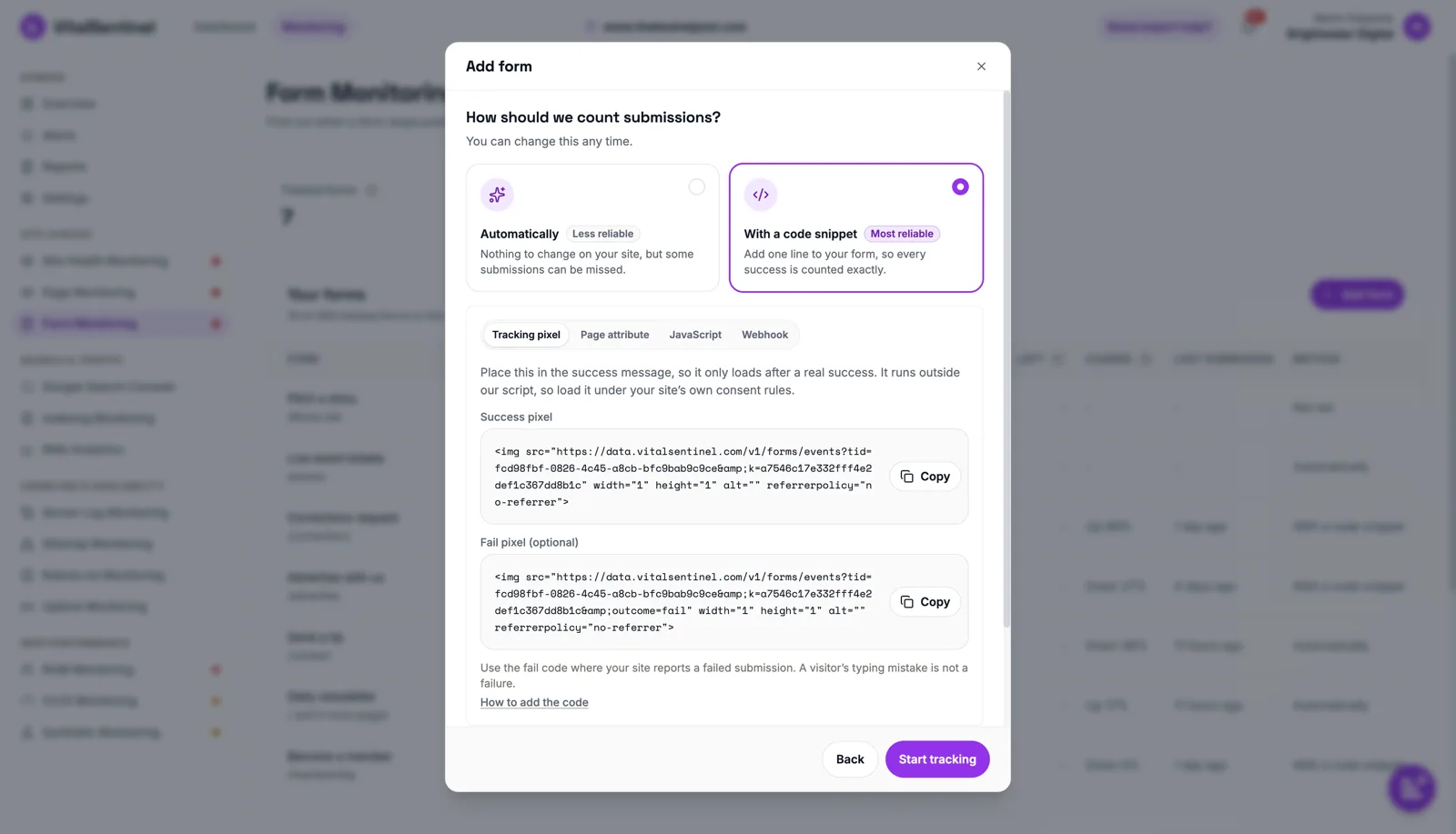
A form embedded from another site is counted with a code snippet or the platform's own signal, not the page attribute. A form that redirects to another page usually needs the webhook or the JavaScript line.
You can change the method any time, and the form keeps its history. Once it is set, run the self-test on the form's Setup tab: submit the form once yourself and watch the submission arrive. VitalSentinel never submits your form.
A few plain numbers
Each form shows a short set of numbers over 7 days, 30 days or 90 days, as your plan's history allows:
- Shown – the form came on screen for a real visitor.
- Submitted – a successful submission.
- Left – left without submitting: Shown, minus Submitted, minus fails where reported.
- Fails – where the form reports them.
- Change – Submitted against the period before.
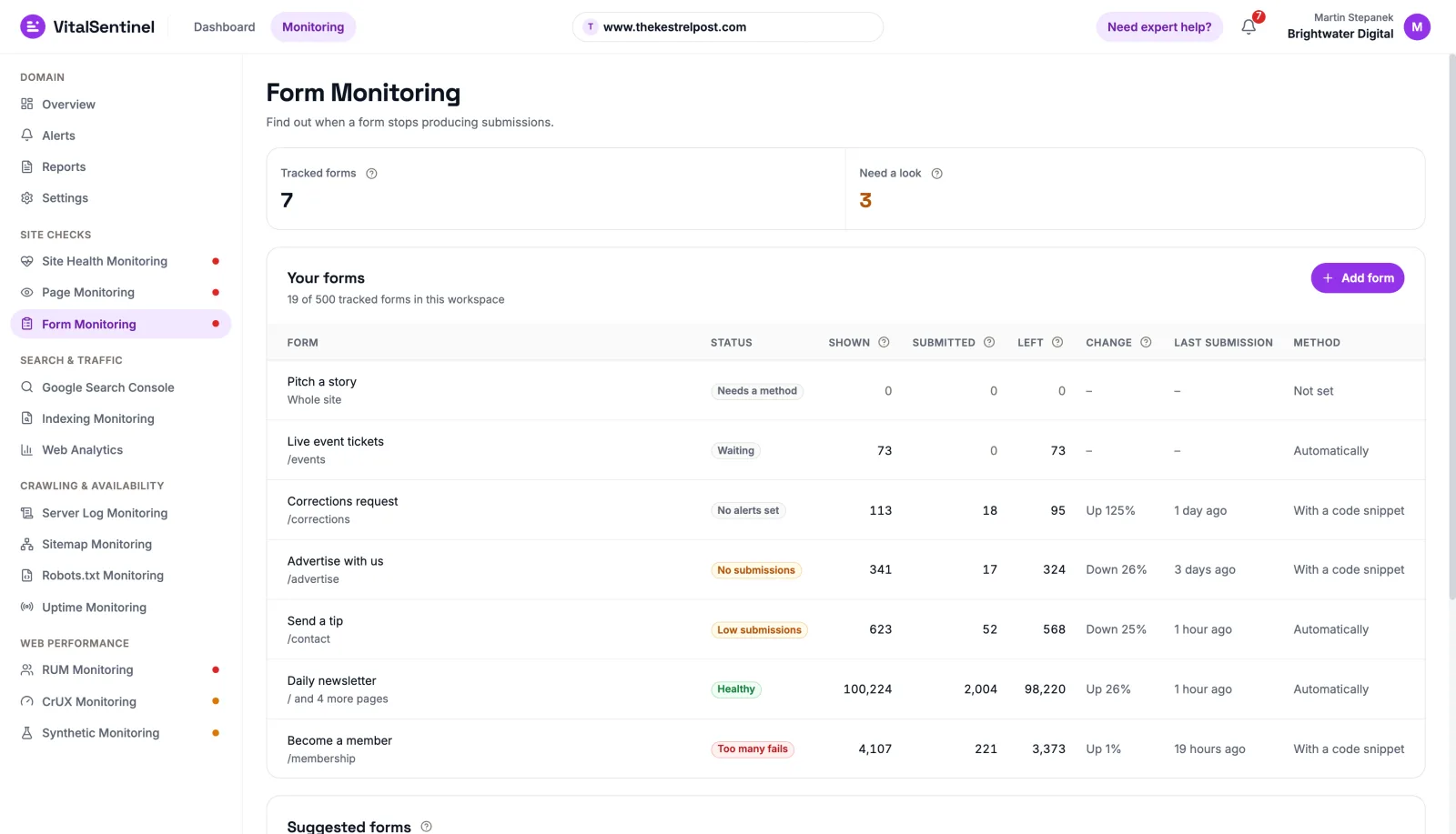
The list is short on purpose. The question it answers is whether the form still works, not how people fill it in.
Alerts you set, not alerts that guess
Each form can have up to three alerts:
- Low submissions – fewer than your limit in an hour, a day or a week.
- No submissions – nothing for the number of hours you choose.
- Too many fails – on forms that report fails, the site rejected more valid submissions than your limit in a period.
What is normal depends on the form, so alerts never turn on by themselves. After 14 days of data, VitalSentinel suggests values for Low submissions and No submissions, and you confirm them on the Alerts page.
A rule waits for the form's first submission plus one full period. Each alert fires once, stays open until the form is back within its limit, then sends a recovery notice. Alerts arrive in the app and by email, and from Lite up in Slack or through webhooks.
Plans
Form Monitoring is on every plan. Tracked forms are counted for the whole workspace:
- Free: 1 form
- Starter: 5 forms
- Lite: 25 forms
- Standard: 150 forms
- Advanced: 500 forms
Form events don't use your plan's quotas. The pricing page has the full breakdown.
Getting started
Verify your domain and add the Forms tag, forms.js, then open Form Monitoring and add the form you would least like to see break. Choose how it is counted, and after 14 days, confirm the suggested alert values.
How to add the code (opens in a new tab) in the docs shows where each snippet goes, and the Form Monitoring page has the full overview.

Written by
Martin Stepanek
Enterprise Technical SEO Consultant
15+ years building enterprise websites and designing the infrastructure behind them, and 5+ in technical SEO and web performance. My work is making companies findable – not just on Google, but inside ChatGPT and the other AI engines people now ask first. I write a regular newsletter and blog on technical SEO at TechSEO Vitals, and I built VitalSentinel because the gap between something breaking and someone noticing should be minutes, not days.
The VitalSentinel Newsletter
New features as they ship and practical technical SEO tips. One email a week at most.
