


When I started VitalSentinel, I wrote down the list of things I always needed to know about a website and never had in one place. How fast it is for real visitors. Whether Google can crawl it, index it and rank it. What Googlebot and the AI crawlers actually request. Whether the site is up. What changed on the pages that make money.
As of this month, every item on that list is a module, and every module is finished. 12 modules: ten monitors and two analytics, all on every plan, Free included. The last four, Server Log, Sitemap, Page and Site Health Monitoring, went live in the first week of October. The public API and the MCP server arrived in August.
Finishing the list changed the question. It was no longer "what is missing?" but "can someone who is not an SEO open this and know what to do?" The honest answer was: not always. So we rebuilt the app.
What we changed, and why
A monitoring tool is easy to fill with charts. Twelve modules can produce hundreds of numbers, and every one of them is true. But a site owner opening the app on a Monday morning does not want hundreds of numbers. They want to know three things: is anything wrong, does it matter, and what do I do about it.
So every screen now follows the same order:
- The answer first. A verdict in plain words: "On Phone, Core Web Vitals fail (LCP and INP)", "4 modules need attention", "Pages that Google could show before are now set to noindex on 8% of your pages."
- Then the few things worth fixing, ranked by what is at stake: Google clicks, visits, revenue.
- Then the detail. Every table, raw value and chart is still there, one click away in a drawer or an advanced section. Experts lose nothing. Everyone else no longer has to dig.
Where a technical term is the right word, we use the official one (LCP, INP, TTFB, 5xx) and explain it in a small info popover right next to it.
The Dashboard: every site, sorted by what needs you
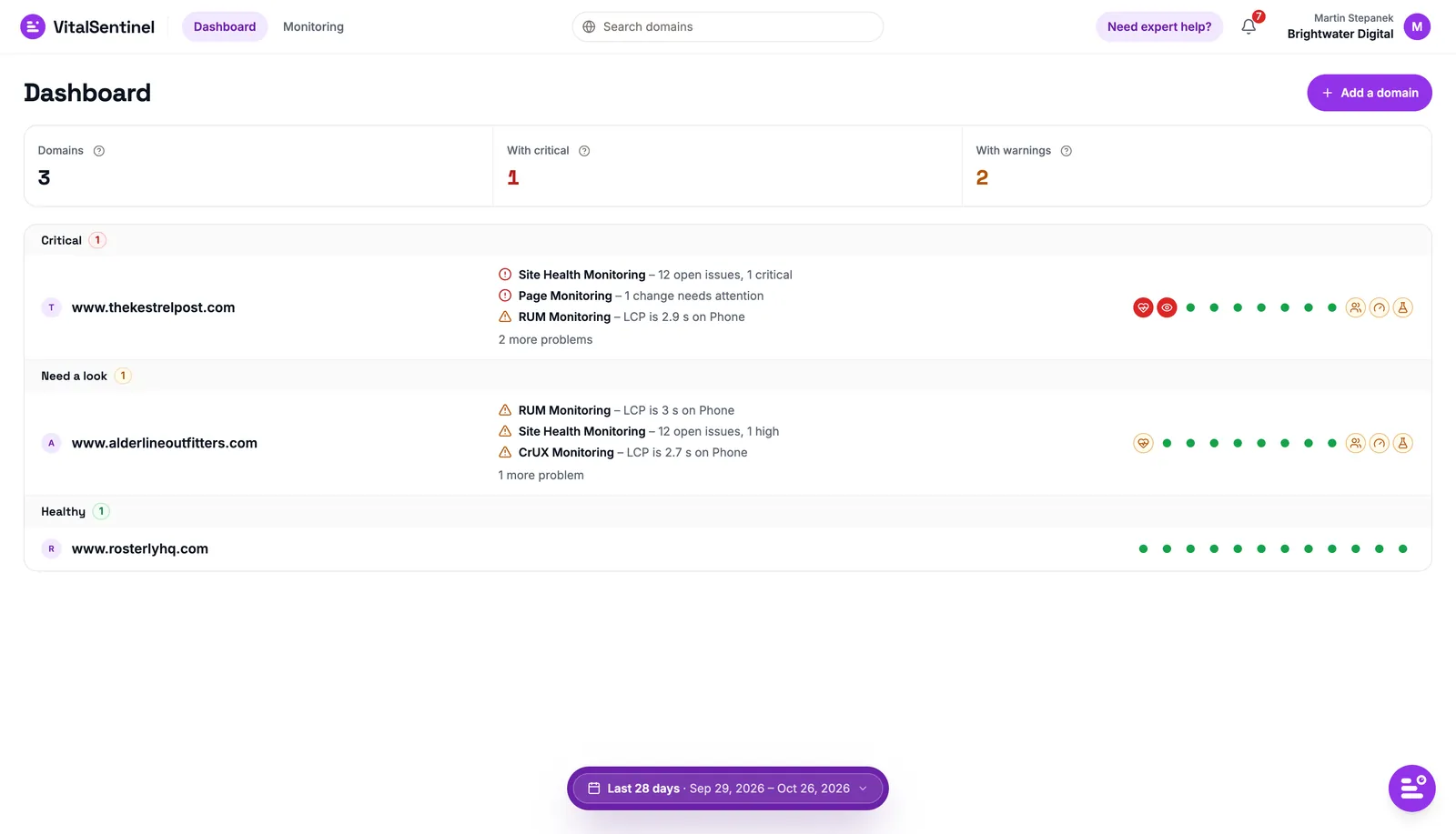
The new Dashboard sorts your sites into Critical, Need a look and Healthy. Each site shows its top problems in one line each, "Site Health Monitoring – 12 open issues, 1 critical", "RUM Monitoring – LCP is 3 s on Phone", and one dot per module. If you run twenty client sites, the three that need you today are at the top.
The Overview: what changed, and what it costs you
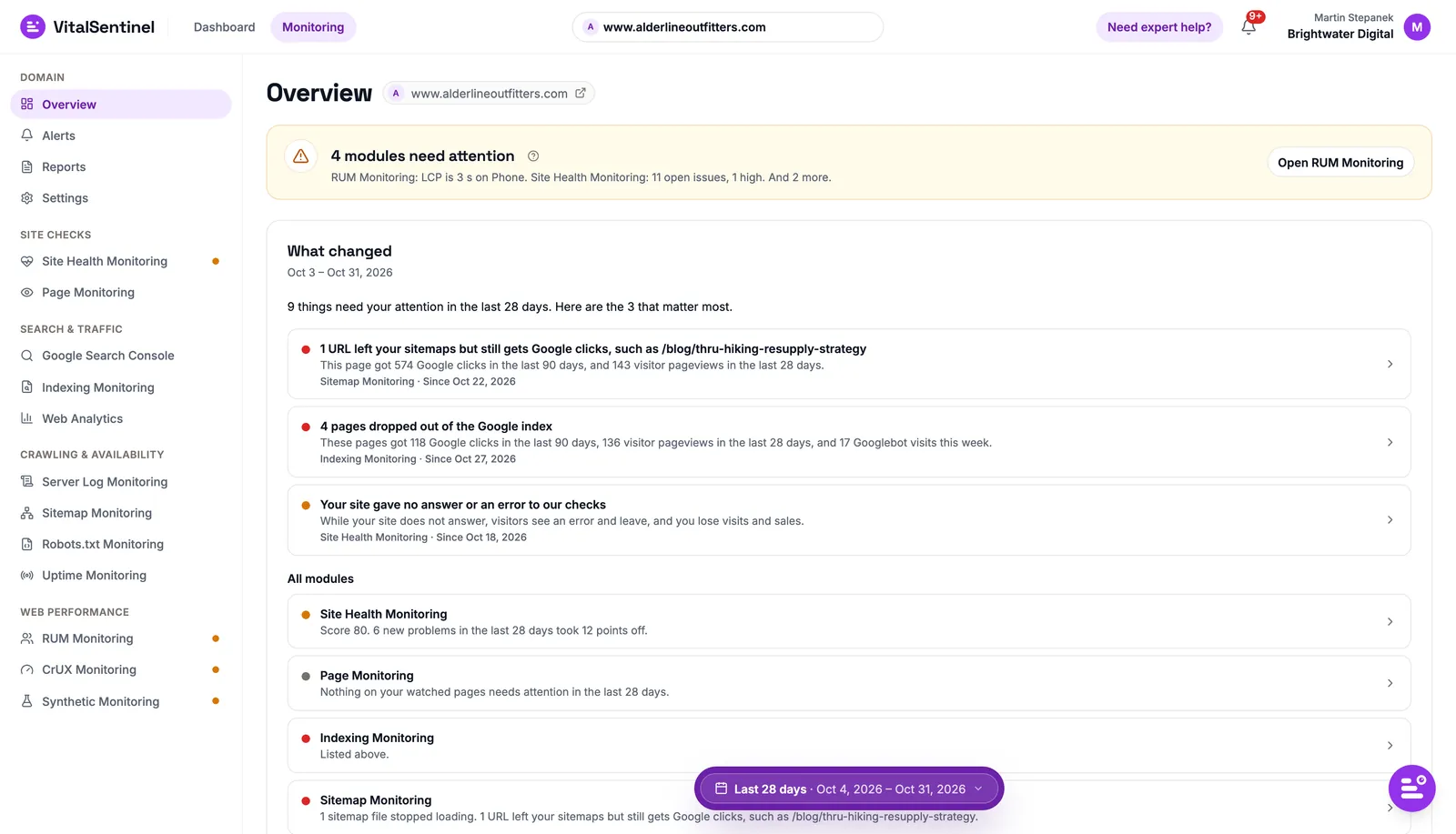
Each site's Overview opens on a verdict, then What changed: the three changes that matter most in the period, each with what it puts at stake. "4 pages dropped out of Google's index. These pages got 120 Google clicks in the last 90 days." Below that, a card for every module, colored by how it is doing. The verdict is built from rules, not AI, and How this is judged explains exactly how.
Modules that point at each other
This is the part I am proudest of. A finding in one module now links to the evidence in every other module that has it.
An outage in Uptime Monitoring shows what it cost: visits, orders and revenue from Web Analytics, and how long Googlebot took to come back, from your server logs. A noindex caught by Site Health Monitoring shows the Google clicks those pages had. A slow page in RUM Monitoring offers to watch it in Page Monitoring. A robots.txt change shows the clicks of the pages it blocked.
And when a module is not connected yet, the place where its data would have answered your question tells you so, with a button to connect it.
Alerts that tell you what to do
Alerts were rebuilt from scratch. Start from a template, "Essentials – know when the site breaks", "Online shop – protect your sales", "Launch or migration week – tight limits", or build your own rule. Every alert says what happened, why it matters and up to three steps to fix it, with a link straight to the problem.
They reach you in the app and by email on every plan, and in Slack or through signed webhooks from Lite up. When a problem goes away, you hear about that too.
Reports that send themselves
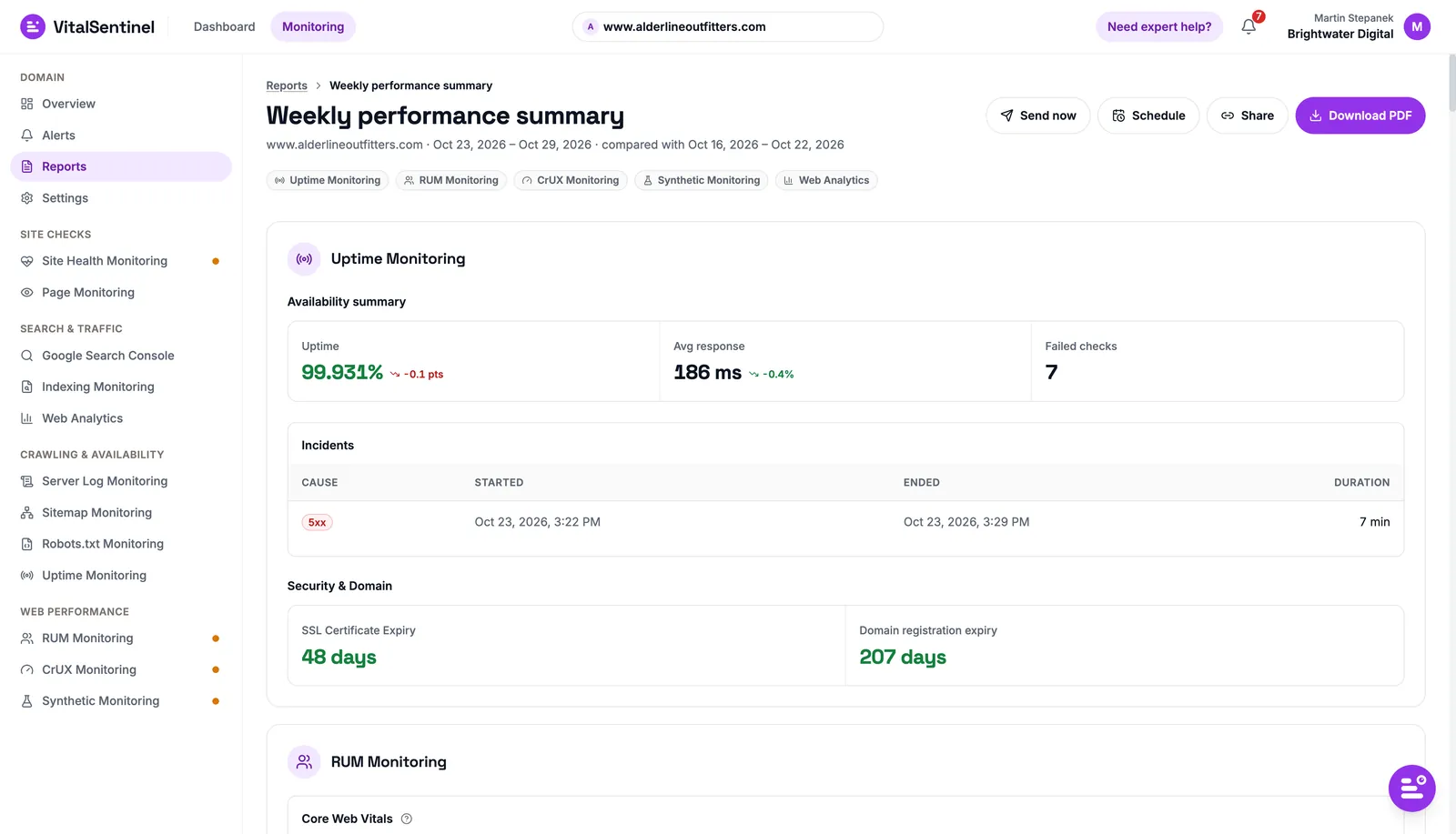
Reports are new. Build a PDF from any module, then Send now to up to ten addresses, Schedule it weekly or monthly, or Share a read-only link that works without an account. For agencies, this is the client report that used to take an afternoon.
Setup that ends fully connected
The setup wizard now walks a new domain through everything in one go: the address, one tracking script for both RUM and Web Analytics, Google Search Console, server logs, and verification, with six ways to prove the site is yours. The goal is simple: a domain should leave setup with every module running, or with a clear path to finish.
Meet Theo
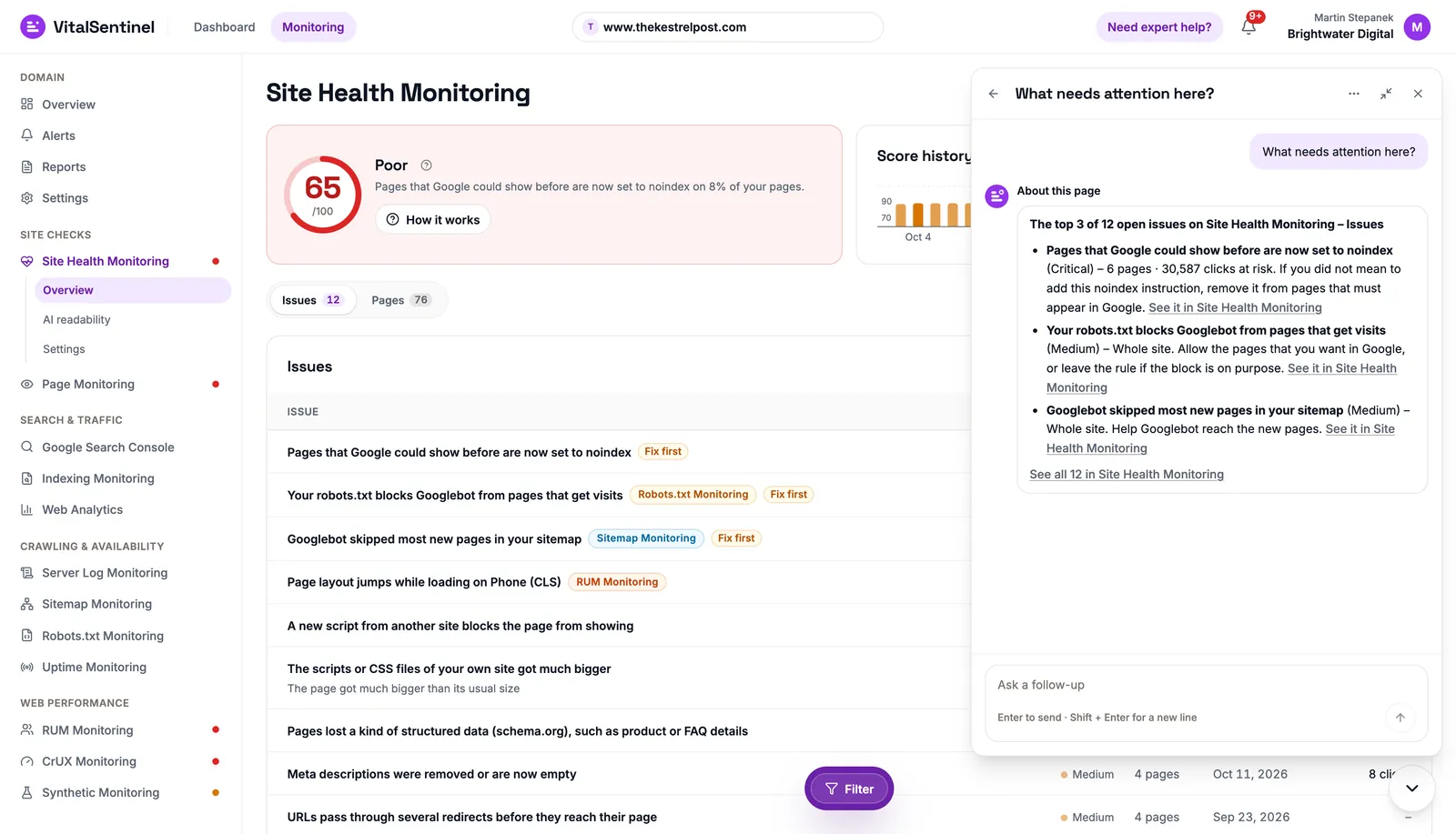
The "how it works" boxes that used to sit on top of every page are gone. In their place is Theo, the AI assistant inside VitalSentinel. Theo knows which page you are on, reads your own monitoring data and answers in plain words. It speaks up on its own when, for example, RUM Monitoring stops receiving data. It only reads, never changes anything, and it is included on every plan.
Theo deserves its own post, and it has one: Meet Theo, the AI assistant that watches your sites with you. There is also a page about it: Theo.
And a free extension for Chrome
Last week we also published the VitalSentinel SEO Extension for Chrome. It checks the page you have open, without an account: on-page SEO, indexability, AI crawler access, Core Web Vitals on your device, structured data, headers and Consent Mode v2. Sign in, and your Google Search Console, index, CrUX and Web Analytics data shows up on every page of the sites you monitor.
What did not change
Every module is still on every plan. You pay for capacity (how many domains, how much data, how often checks run), never for features. And the Free plan is still 1 domain, all 12 modules, no credit card.
If you have used VitalSentinel before, log in and look around. If you have not, start for free and add your first site. Either way, I would love to hear what you think. Ask Theo, and if Theo cannot help, it will hand the conversation to our team.

Written by
Martin Stepanek
Enterprise Technical SEO Consultant
15+ years building enterprise websites and designing the infrastructure behind them, and 5+ in technical SEO and web performance. My work is making companies findable – not just on Google, but inside ChatGPT and the other AI engines people now ask first. I write a regular newsletter and blog on technical SEO at TechSEO Vitals, and I built VitalSentinel because the gap between something breaking and someone noticing should be minutes, not days.
The VitalSentinel Newsletter
New features as they ship and practical technical SEO tips. One email a week at most.
