


One of my sites logged 25,418 crawler hits in 30 days. 1,943 of them said Googlebot.
994 of those weren't Google. They came from addresses outside Google's published ranges. A report that counts by user agent, the name a bot gives itself, would have called every one of them Googlebot.
The fakes also hid the real error rate. Counted by user agent, the AI crawler and AI search categories on this site got a 4xx on 51.4% of their requests. Verified, they got none.
Log analyzers differ in how they handle that lie, how fast the data arrives and what they cost. The numbers here come from my own logs, read in VitalSentinel. I didn't run Screaming Frog, JetOctopus, Botify or Semrush on them, so I compare those from their public pages.
Verify the bots first. Then pick the analyzer for the job you actually have.
What a log answers that Google Search Console can't
Google Search Console's Crawl Stats report is free. Its own help page (opens in a new tab) lists the limits. It covers root-level properties only. Example URLs are samples. And "some requests might not be counted", so the numbers can differ from your server logs. It also shows Google only, with nothing on Bing or the AI crawlers.
A server log is the full record: every request your server answered, with the URL, status code, user agent, IP address and time. If a URL never appears in it, no bot asked your server for it.
Summarized, the log becomes a daily count of who asked. This is the same site in Server Log Monitoring, over an earlier window.
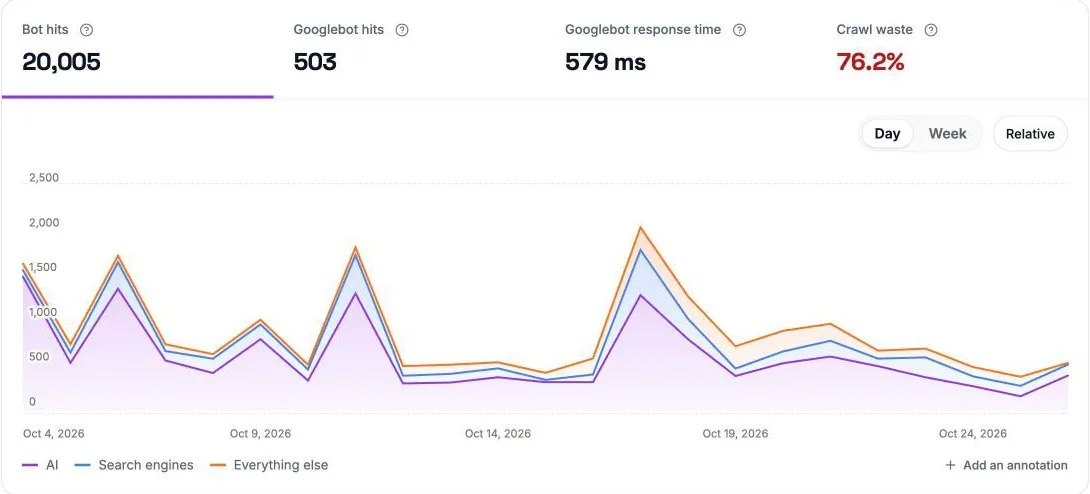 Crawler hits per day, split into AI, search engines and everything else.
Google's crawl budget guide (opens in a new tab) only targets sites with 1 million or more unique pages, or 10,000 or more that change daily, and calls those "not exact thresholds". Below that size, the log earns its place by catching fakes and errors.
Getting the logs
Ask your developer for the last 30 days of access logs in combined format, with the client IP and the user agent.
Take them from the origin server, not just from the CDN dashboard. A page it serves from cache never reaches the origin. So check whether the CDN can ship its own logs too.
Logs also hold your visitors' IP addresses, which is personal data. Keep only the crawler lines.
Step one: separate real Googlebot from fakes
I cover how to check each hit by its IP address, with reverse and forward DNS or Google's published IP range files, in Fake Googlebot: What 100 Sites Return to It. For a single address, paste it into the free Googlebot IP checker.
Server Log Monitoring checks every hit that way and puts the four verdicts side by side.
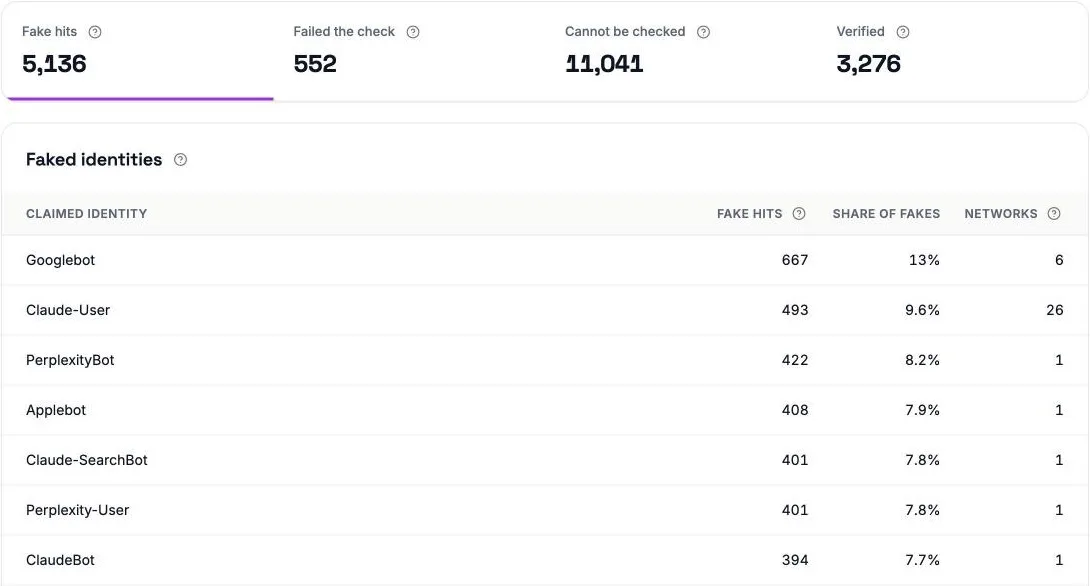 Fake, failed, cannot-be-checked and verified hits side by side over an earlier window, with the claimed bot names under Faked identities.
Compare the status mix of every claimed Googlebot hit with verified hits only.
Your log stays in this tab. Nothing you paste is uploaded. Up to 20,000 lines or 2 MB.
A browser cannot run the reverse and forward DNS lookup Google documents (opens in a new tab) as the manual check, which “is sufficient for most use cases”. This checks IP ranges only. For one address with DNS use the Googlebot IP checker.
On my site: verified Googlebot got a 2xx on 918 of 949 requests (96.7%). Fake Googlebot got a 4xx 94.4% of the time.
Until the fakes are out, every Googlebot number you quote is wrong.
Reading the data: status codes per bot
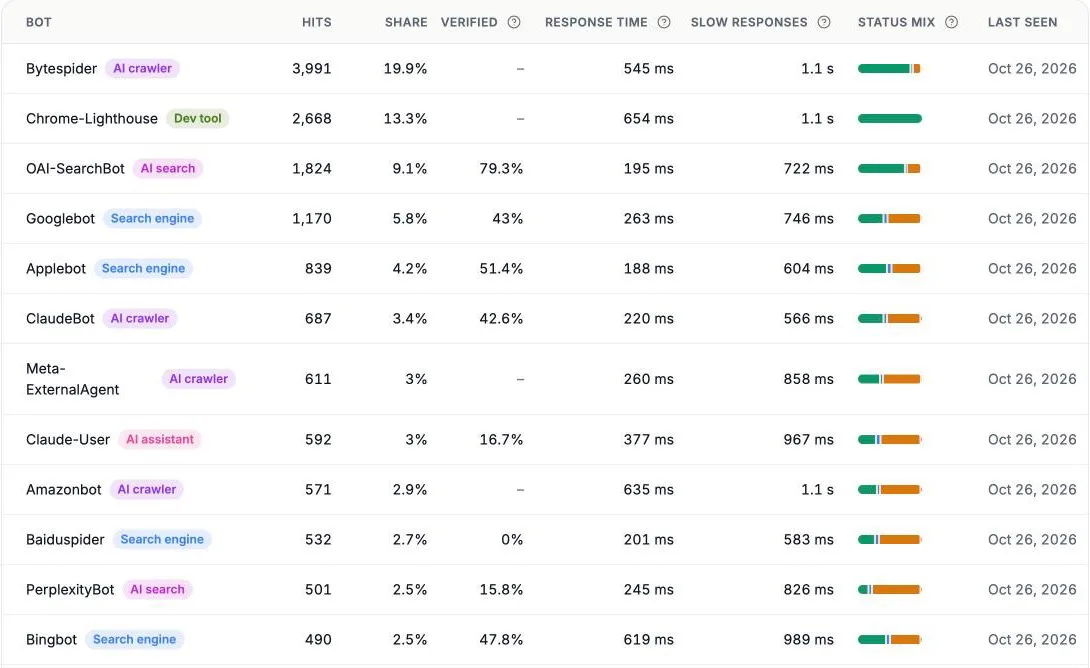 Each bot gets its own status mix bar, next to its hit count and verified share.
Count by user agent and the AI categories on this site look broken. The AI assistant names got a 4xx on 84% of their requests.
Count verified hits only and the picture flips. Verified AI crawlers and AI search bots made 1,423 hits. About 99% got a 200 and none got a 4xx. The errors came from fakes and from names I can't check.
That's this site only. On two of my other sites, www.technickeseo.sk and www.techseovitals.com, verified AI hits did get a 4xx: 26.5% and 12.6% of them.
Status codes also answer the usual audit questions: which sections get crawled, which URLs return 404 to a verified bot, which pages Googlebot skips.
AI crawlers in your logs
Split the AI names by job before you count them, training, search or a fetch a person asked for, as I cover in AI Crawlers on Your Server: More Than One in Four Hits Was Fake, Half Can't Be Checked.
In my verified hits on this site, search crawlers outweighed the training crawler by a wide margin.
| Verified AI crawler | Hits |
|---|---|
| OAI-SearchBot | 716 |
| ClaudeBot | 472 |
| PerplexityBot | 168 |
| GPTBot | 46 |
Split them so you know what you're looking at. Then leave them alone. I don't recommend blocking AI crawlers. Search crawlers and fetchers that act for a user are how your pages get into AI answers, and on this site they made most of the verified AI hits.
Free option: the log file analyzer
Run any nginx or Apache combined log through the free log file analyzer. It lists every bot in the file, fakes and AI crawlers included, plus the crawl errors each one got.
Same job, four analyzers on paper
This comparison uses only what each vendor's own pages document, checked on November 2, 2026.
| Analyzer | Runs as | Free use | Paid price | Fake bot check | How logs arrive |
|---|---|---|---|---|---|
| Screaming Frog Log File Analyser (opens in a new tab) | Desktop app (Windows, macOS, Linux) | 1,000 log events | £99 a year, no limit | Verifies search bots, shows spoofing IPs | You drag in files |
| JetOctopus (opens in a new tab) | Cloud | 7-day trial, no card | Growth from $349 a month (annual), 2 million log lines | Reverse DNS on every request (opens in a new tab) | 12 methods, incl. real-time Nginx stream and Cloudflare Logpush |
| Botify LogAnalyzer (opens in a new tab) | Cloud | Demo only | Not public | Uses the client IP, method not described | Nightly via FTP, S3 or a CDN |
| Semrush Log File Analyzer (opens in a new tab) | Upload | Not stated | Not stated | None stated; page shows Googlebot only | Upload |
Screaming Frog wins on cost and one-off audits. It reads Apache, W3C Extended and Amazon Elastic Load Balancing formats, and reports AI bots like ChatGPT. There's no live stream.
JetOctopus wins on live streams and joining logs with crawl data. It says it tracks "40+" crawler types (opens in a new tab), GPTBot, ClaudeBot and PerplexityBot among them. That count is its own claim.
Botify names GPTBot, ClaudeBot and the other main AI bots. It fits enterprise sites with a delivery pipeline already in place.
Which analyzer fits which job
For a one-off audit, use the free log file analyzer or Screaming Frog. Don't pay monthly for a single question.
For a small site you want watched, you need verified bots and an alert when something changes. That's a streamed source, not a monthly upload, and it's what I built VitalSentinel's Server Log Monitoring for. It shows which search and AI crawlers hit the site, verified or fake, and what the server answered.
For a site with millions of pages, joining logs with crawl data is the real job. That's JetOctopus or Botify territory.
Whatever you choose, ask one thing in the demo: how does it decide a hit is fake? JetOctopus and VitalSentinel say how: reverse DNS and published IP ranges. Botify says it does and doesn't say how.
Count who's asking before you count anything
About half of the Googlebot on this site wasn't Google. 994 of the 1,943 hits that claimed the name came from outside Google's ranges.
The fakes also inflated the error rate. Counted by user agent, the AI crawler and AI search categories got a 4xx on 51.4% of their requests. Verified, they got none. On two of my other sites, verified AI bots did get real errors, so check each site on its own.
In the verified traffic, OpenAI's search crawler made more than 15 times the hits of its training crawler.
Log file analysis starts with who's asking. Every analyzer after that is a choice about speed and price.

Written by
Martin Stepanek
Enterprise Technical SEO Consultant
15+ years building enterprise websites and designing the infrastructure behind them, and 5+ in technical SEO and web performance. My work is making companies findable – not just on Google, but inside ChatGPT and the other AI engines people now ask first. I write a regular newsletter and blog on technical SEO at TechSEO Vitals, and I built VitalSentinel because the gap between something breaking and someone noticing should be minutes, not days.
The VitalSentinel Newsletter
New features as they ship and practical technical SEO tips. One email a week at most.
