


I monitor a large site that blocks a whole folder in robots.txt. One Disallow line covers every URL in it. The rule has been live for months. 1,477 of those URLs are still in Google.
Google Search Console files them under Indexed, though blocked by robots.txt. It's a classic mistake. A team wants pages out of Google, reaches for Disallow, and Google keeps them anyway.
One Disallow rule, 1,477 URLs still in Google
Let's go straight to the data. The folder holds pages the site doesn't want in Google. Call it /legacy/. The rule is one line:
User-agent: *
Disallow: /legacy/
This is where Google's own URL inspections put that folder today. I scaled every count by the same factor to keep the site anonymous, so the ratios are real:
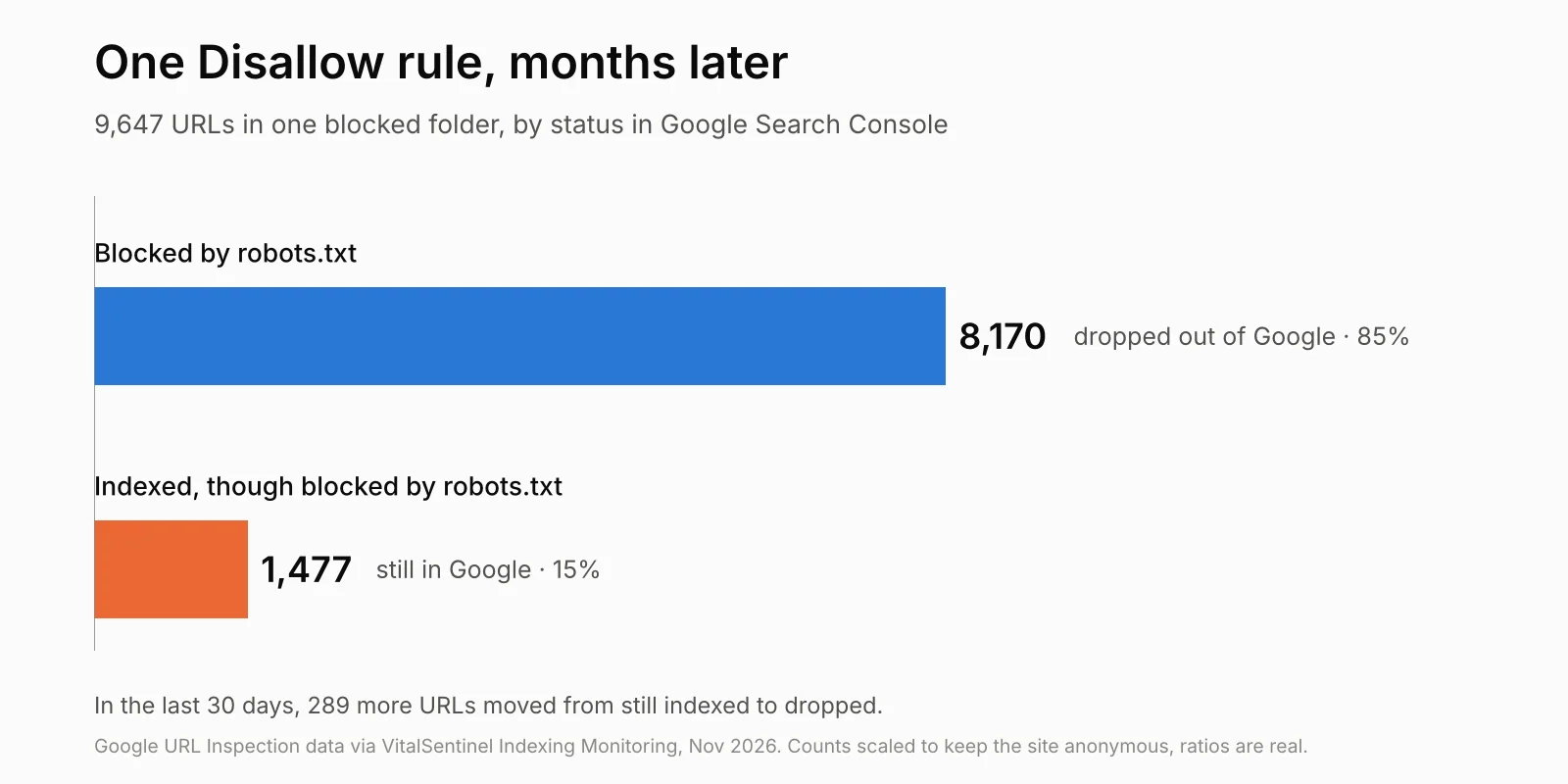 Of 9,647 URLs in one blocked folder, 8,170 have dropped to Blocked by robots.txt and 1,477 are still Indexed, though blocked by robots.txt.
About 15% of the blocked folder is still indexed. The rest is leaving slowly. In the last 30 days, 289 more URLs moved to Blocked by robots.txt. Every one I spot-checked made the same move: out of Indexed, though blocked, with Google's chosen canonical cleared.
A second rule on the same site blocks a customer-account page that's linked site-wide. 50 of those URLs are still indexed too. Account pages are the textbook case for a login, not a Disallow.
Googlebot hasn't given up either. On many blocked URLs, Google Search Console shows a crawl attempt from within a day of the inspection. Disallow doesn't stop Google from wanting the page. It only stops Google from reading it.
Why a blocked URL stays in Google
Google's Page indexing help (opens in a new tab) says Google won't request a page while robots.txt blocks it. It can still index the URL when other pages link to it, so any snippet stays thin. A URL indexed before the rule went in can also stay. The block stops new fetches. It doesn't remove a URL Google already has.
On this site, two signals keep feeding that. Every blocked URL still gets internal links from live pages on the site. And the XML sitemaps still list 10,214 URLs that this one rule blocks. The site tells Google the page matters and tells it not to look, both at once.
This is an easy mistake after a cleanup or a migration. Someone closes an old or duplicate folder in robots.txt. The sitemaps and the internal links stay as they were. Google keeps the URLs it already knows.
Disallow stops the fetch, so the noindex is never read
Google's robots.txt introduction (opens in a new tab) says robots.txt is mainly there to avoid overloading a site. It is "not a mechanism for keeping a web page out of Google". The same page points to noindex or a password for that job.
Noindex is written on the page, in the HTML or in the response header. Google can only obey it after fetching the page. A Disallow stops the fetch.
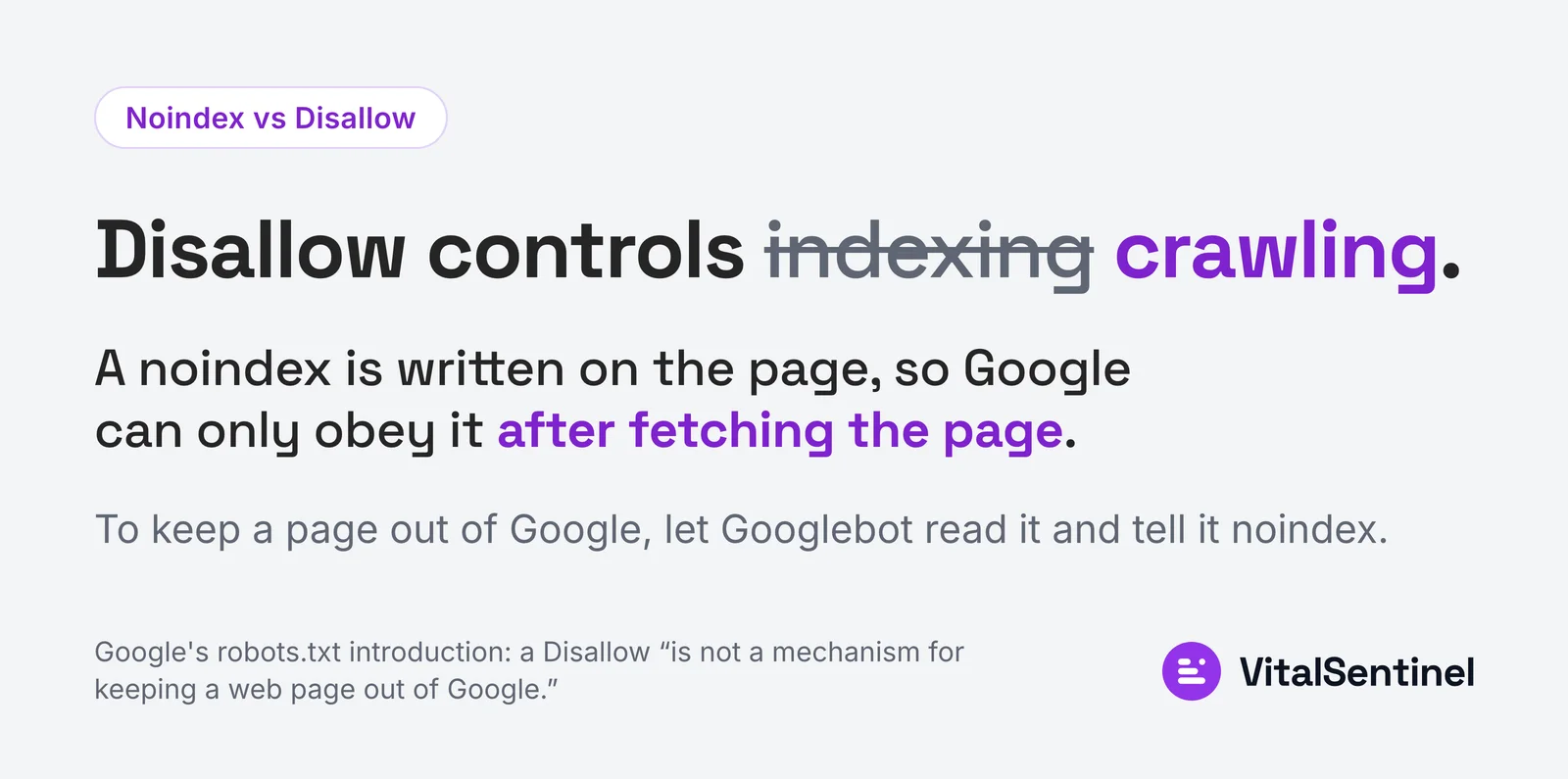 Disallow decides what Googlebot fetches. A noindex only works on a page Google is allowed to fetch.
The common move is to disallow a URL and add noindex to be sure. Google's noindex documentation (opens in a new tab) says the rule only works when robots.txt doesn't block the page. With both in place, Google sees neither the content nor the noindex.
To show what actually arrives, I ran six scenarios through a local nginx server. The crawler was Python's urllib.robotparser, which reads robots.txt first and requests only what it allows:
| Scenario | robots.txt | Status | Signal received |
|---|---|---|---|
| plain page | allowed | 200 | none |
| Disallow only | blocked | not sent | none |
| meta noindex only | allowed | 200 | meta noindex |
| X-Robots-Tag only | allowed | 200 | header noindex |
| Disallow plus meta noindex | blocked | not sent | none |
| meta noindex, script removes it | allowed | 200 | noindex in raw HTML |
The nginx log lists robots.txt and every allowed URL. It never lists the two disallowed pages, so the noindex on the combined page was never requested.
Some robots.txt files still carry a Noindex: line. Google dropped support for it in 2019 (opens in a new tab), so search your own file for it.
To see which rule blocks a URL, paste it into the free robots.txt tester. It names the rule behind each verdict for 29 crawlers.
The tester only reads robots.txt. It tells you whether a URL is crawlable, not whether it is indexable. The indexability checker reads the meta tag and the header as well.
Switch the signals on and off. Googlebot reads a noindex only on a page it fetches.
- robots.txt
- Blocked
- Googlebot request
- Not sent
- Signal received
- none
- Search Console status
- Indexed, though blocked by robots.txt
The noindex is on the page, but Googlebot never requests it.
Not fetched. Signal received: none. Search Console status: Indexed, though blocked by robots.txt.
Meta robots and X-Robots-Tag are the same rule in different places
The meta tag lives in the HTML head:
<meta name="robots" content="noindex">
The header lives in the HTTP response:
X-Robots-Tag: noindex
Google's spec (opens in a new tab) says any rule that works in a robots meta tag also works as a header. A PDF, a video or an image has no HTML head, so those need the header. If the two disagree, the more restrictive rule applies.
The header is the one people miss. View-source shows nothing, so run curl -sI on the URL and look for x-robots-tag. On nginx, watch inheritance. A location block with its own add_header drops the headers set at server level (opens in a new tab), X-Robots-Tag included.
JavaScript can add noindex but can't reliably remove it
Google's JavaScript documentation (opens in a new tab) suggests adding a robots meta tag with JavaScript to error pages on sites with client-side routing. The reverse is unreliable. When Google sees noindex in the original HTML, it may skip rendering, so a script that removes the tag may never run. Google's advice is plain: if you want the page indexed, keep noindex out of the original code.
The Vercel and MERJ study (opens in a new tab) tested this in practice. Pages with noindex in the initial HTML weren't rendered, whatever JavaScript they carried, so a script that removed the tag never ran. Fix a noindex on the server, in the template or the header. To see which version carries the tag, paste the URL into the free raw vs rendered HTML tool. It puts meta robots from both versions side by side.
How to get a blocked URL out of Google
- Open the Page indexing report in Google Search Console and click Indexed, though blocked by robots.txt.
- Sort the examples into pages you want in Google and pages you don't. For the first group, the rule is the bug, so narrow it or remove it. The free robots.txt tester names the line that blocks each URL.
- For pages you want out, remove the Disallow line that matches them.
- Add
noindexas a meta tag or a header. Put account and private areas behind a login instead. - Request a recrawl of the most important URLs with the URL Inspection tool.
- Once they're gone from Google, take them out of the XML sitemaps and remove the internal links.
Don't do step 6 first. Google has to fetch a page again to see its noindex, and links and sitemaps are how it finds the way back.
Google's noindex documentation (opens in a new tab) warns it may take months for Googlebot to revisit a page. With the Disallow left in place, my data shows how slow it gets: months later, 1,477 URLs are still to go.
Google's October spam guide offers the option that fails
On October 26, Google added a section called "Only index content meant for Search" to its guide on preventing spam and abuse (opens in a new tab). For pages made for sharing, collaboration or utility, it tells sites to apply noindex or block crawling in robots.txt by default.
Search Engine Journal (opens in a new tab) pointed out the conflict with Google's own robots.txt and noindex pages. The 1,477 URLs above are what the second option looks like months later.
My rule: use noindex to keep pages out of Google. Use Disallow when the problem is crawl load, not listing.
Which one to use by page type
| Page type | Use |
|---|---|
| Internal search, thank-you pages, share links | Meta noindex, no Disallow |
| PDFs, images, video | X-Robots-Tag header |
| Staging, account areas, anything private | Password or login |
| Endless filter and sort URLs | Disallow |
| Old or duplicate folders you want gone | Noindex first, Disallow later only if crawl load demands it |
| Already showing Indexed, though blocked | Remove the Disallow, add noindex |
Catch it in days, not months later
Google Search Console shows the status as a count and a sample. It doesn't show which URLs are fading out and which are stuck. Indexing Monitoring inspects URLs every day and keeps each one's history. That's how I can say which 289 left this month and which 1,477 didn't.
The sitemap conflict is the earlier warning. robots.txt Monitoring compares the rules with your sitemaps and lists the sitemap URLs each Disallow blocks. On this site, one line accounts for 10,214 of them.

Written by
Martin Stepanek
Enterprise Technical SEO Consultant
15+ years building enterprise websites and designing the infrastructure behind them, and 5+ in technical SEO and web performance. My work is making companies findable – not just on Google, but inside ChatGPT and the other AI engines people now ask first. I write a regular newsletter and blog on technical SEO at TechSEO Vitals, and I built VitalSentinel because the gap between something breaking and someone noticing should be minutes, not days.
The VitalSentinel Newsletter
New features as they ship and practical technical SEO tips. One email a week at most.
