


An expired certificate is a site-wide problem for Google. Google Search Console's HTTPS report (opens in a new tab) defines "HTTPS has invalid certificate" in one line: "Typically this affects an entire site." Google also warns that many HTTPS issues "can prompt Google to stop crawling your HTTPS pages."
Visitors get a full-page browser warning. "Your connection is not private." No checkout, no login, no pages.
The certificate expired, and you had auto-renew switched on. Automation was supposed to make this impossible.
It usually fails in one of three places. The renewal can't complete its domain check. The new certificate never gets loaded into the server. Or the certificate doesn't cover the hostname people actually type.
The margin for error is shrinking too, because maximum lifetimes drop again in 2027 and 2029. So alert when the renewal point passes without a new certificate, not at a fixed number of days, and check often enough to catch a miss the same day.
What an expired certificate does to visitors and bots
Browsers block the page behind a warning most people won't click through. APIs and webhooks that check certificates strictly stop too. That's often payment processing.
In Google Search Console's HTTPS report, a site-wide certificate error can leave URLs as "HTTPS not evaluated".
I can't tell you how fast that happens, because Google's docs give no timeline for certificate errors. Google's crawling guidance says crawl rate recovers once a server answers with 2xx, but that page covers 5xx and 429 errors, not certificates. Your server logs are the only honest source.
Fix it now: renew, reload, verify
If only one device complains, check its clock first. Cloudflare's SSL error guide (opens in a new tab) lists a wrong clock as a common cause. If all devices complain, the certificate has expired. Do three things, in this order:
- Renew it.
- Reload the web server. A renewed certificate on disk does nothing until the server loads it.
- Check what the server actually presents, not what your certificate manager says it did.
For the check, paste the domain into the free Domain & SSL expiry checker. Do it for the www host and for the bare domain. If the expiry date is still the old one, the server is still serving the old certificate.
Why auto-renew fails
Start with the challenge path. To renew, the certificate authority fetches a small file from your site to confirm you control the domain. A firewall rule or a redirect to a login page can block that request while the site itself looks fine. Paste a plain HTTP URL on /.well-known/acme-challenge/ into the redirect checker and see where it ends up.
Next, the reload. The renewal can succeed while the server keeps serving the old certificate, because nothing reloaded it. Make sure your renewal job reloads the server. Certbot's test run skips the reload by default, so it can pass while the reload step is broken.
After that, coverage. Google's help page on SSL certificate problems (opens in a new tab) lists a hostname mismatch, with www versus the bare domain as its example. The fix is a certificate that lists all hostnames. It usually breaks when someone adds app. or shop. later, issues a new certificate by hand and forgets the old name. Auto-renew then renews exactly what it was told to renew.
Last, the email. Let's Encrypt ended its expiry notifications on June 4, 2025 (opens in a new tab) and pointed people to third-party monitoring. If the emails were your monitoring, you have none.
The schedule from 2026 to 2029
The CA/Browser Forum, where browser makers and certificate authorities agree the rules, sets the maximum in its Baseline Requirements (opens in a new tab).
| Certificate issued | Maximum validity |
|---|---|
| Before March 15, 2026 | 398 days |
| March 15, 2026 to March 15, 2027 | 200 days |
| March 15, 2027 to March 15, 2029 | 100 days |
| From March 15, 2029 | 47 days |
Those dates aren't your deadline if you use Let's Encrypt. It's ahead of the Forum. ISRG, the nonprofit behind Let's Encrypt, set its own dates in From 90 to 45 (opens in a new tab).
| Let's Encrypt profile | From | Lifetime |
|---|---|---|
tlsserver (opt-in) | May 13, 2026 | 45 days |
classic (default) | February 10, 2027 | 64 days |
classic (default) | February 16, 2028 | 45 days |
With these dates, a fixed 60-day renewal schedule stops being enough. ISRG says so plainly (opens in a new tab).
Certbot already moved. Since version 4.0.0 it renews when less than a third of the certificate's lifetime is left. Before that it used a fixed 30 days (opens in a new tab).
Shorter lifetimes add no new failure. They shrink the time you have to notice the old ones.
Alert on a missed renewal, not on days left
Most alerts say "warn at 30 days." Somebody set that when certificates lasted a year.
Even guides written for short certificates keep the countdown. The DEV Community guide by xdsai (opens in a new tab) renews at two thirds of the lifetime, yet still alerts at 30, 14, 7 and 1 days.
A healthy Certbot setup renews when a third of the lifetime is left. That's about 67 days left on a 200-day certificate, 33 on a 100-day one and 15 on a 45-day one. A 30-day alert on a 200-day certificate fires more than a month after a renewal should already have happened. On a 45-day certificate it fires before renewal even runs, each cycle. Then you mute it.
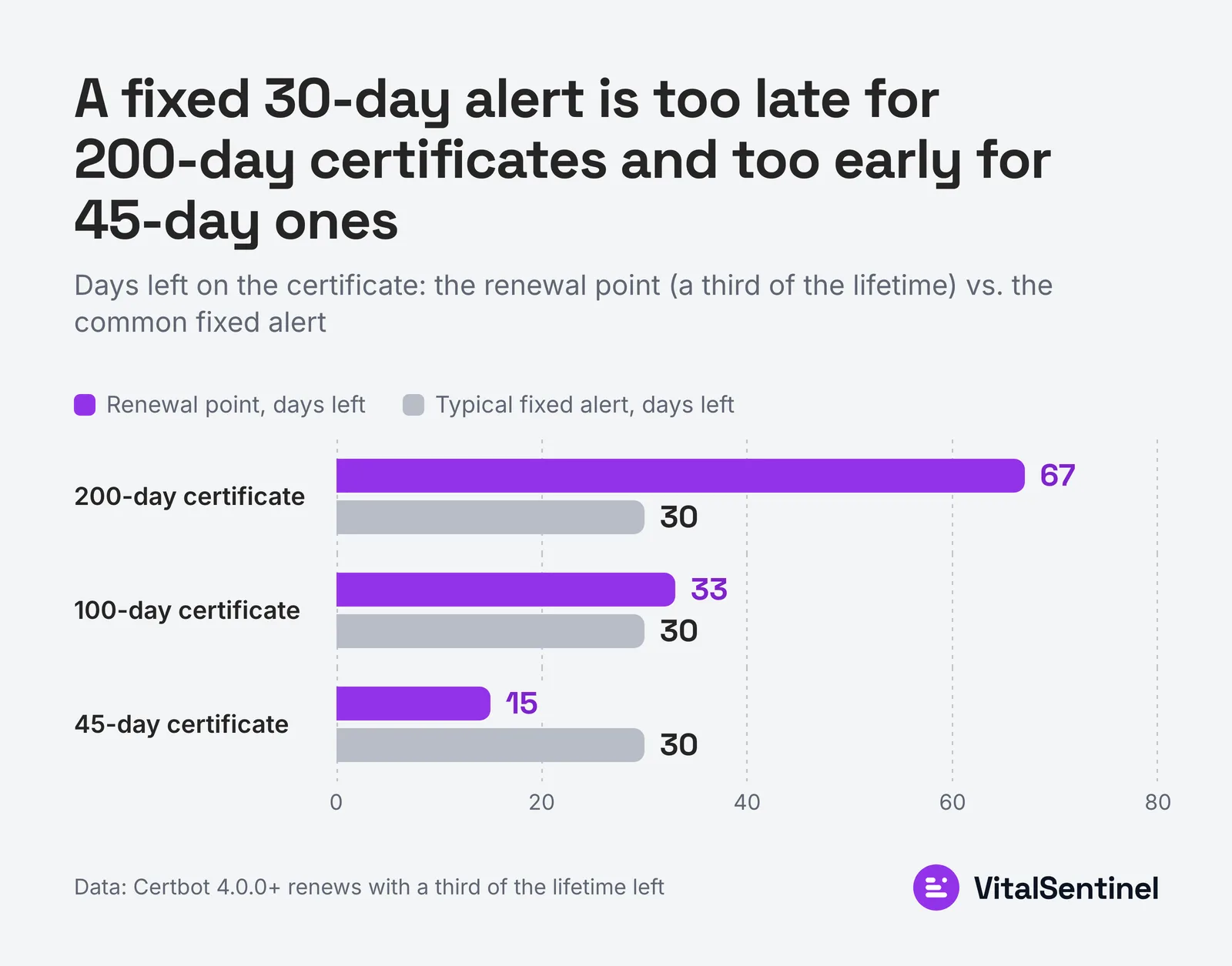 The renewal point is 67 days left on a 200-day certificate, 33 on a 100-day one and 15 on a 45-day one; a fixed 30-day alert fits only the middle.
So alert on the event. Pick the renewal point your client uses. If a certificate passes it and no new one has appeared, that's the alert. Anything after it is a failed renewal, not a countdown.
You don't need a script for this. Uptime Monitoring checks the certificate your server presents several times a day and keeps every certificate change. A renewal that didn't happen shows up as no new certificate past the renewal point, with alerts at 14 and 7 days before expiry as the backstop.
If a certificate expires anyway, the next uptime check fails and logs it as an SSL outage. Checks run every 1 to 5 minutes, so you hear about it within minutes, not when a customer emails you.
Whatever you use, check the live connection. A log of what your certificate manager attempted isn't enough.
Three things to monitor
Watch three things: the certificate the server presents, the renewal margin cycle by cycle, and the domain registration.
The margin is the useful one. A certificate that normally renews with 20 days left, then shows up renewed with 13, is drifting. On a demo site, the certificate history shows exactly that drift.
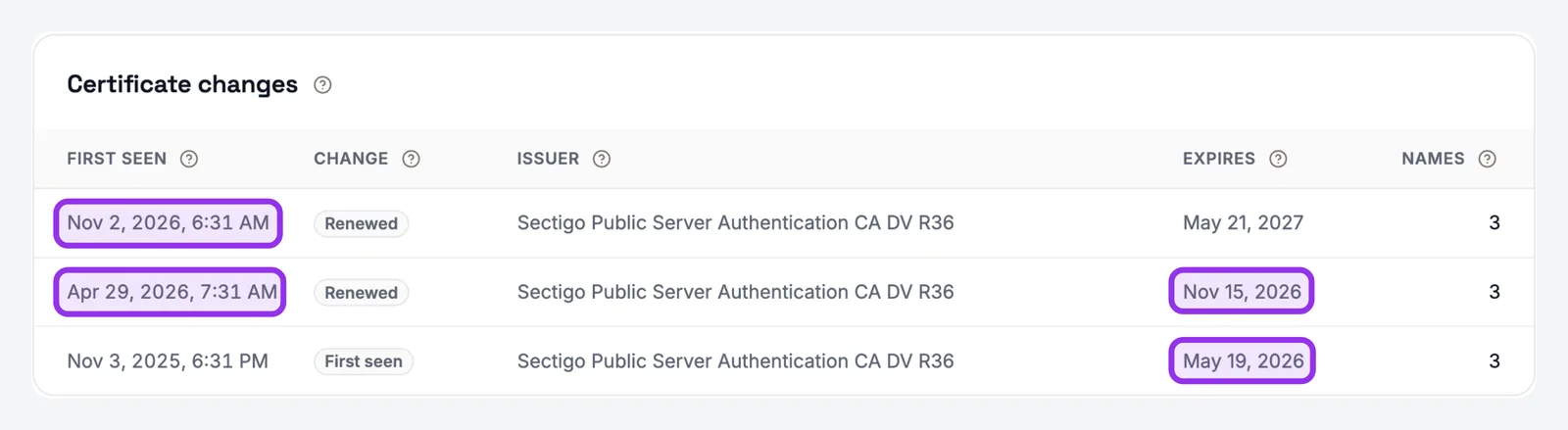 Demo workspace: the Nov 2 renewal landed 13 days before the old certificate expired (Nov 15), against 20 days at the April renewal (expiry May 19).
Each certificate was valid when you looked. The trend across them is the warning. Without a tool, write down the days left each time a certificate is replaced.
A late renewal should open an issue that closes when the new certificate appears. On the same demo site, that issue in Site Health Monitoring closed itself the day the renewed certificate showed up.
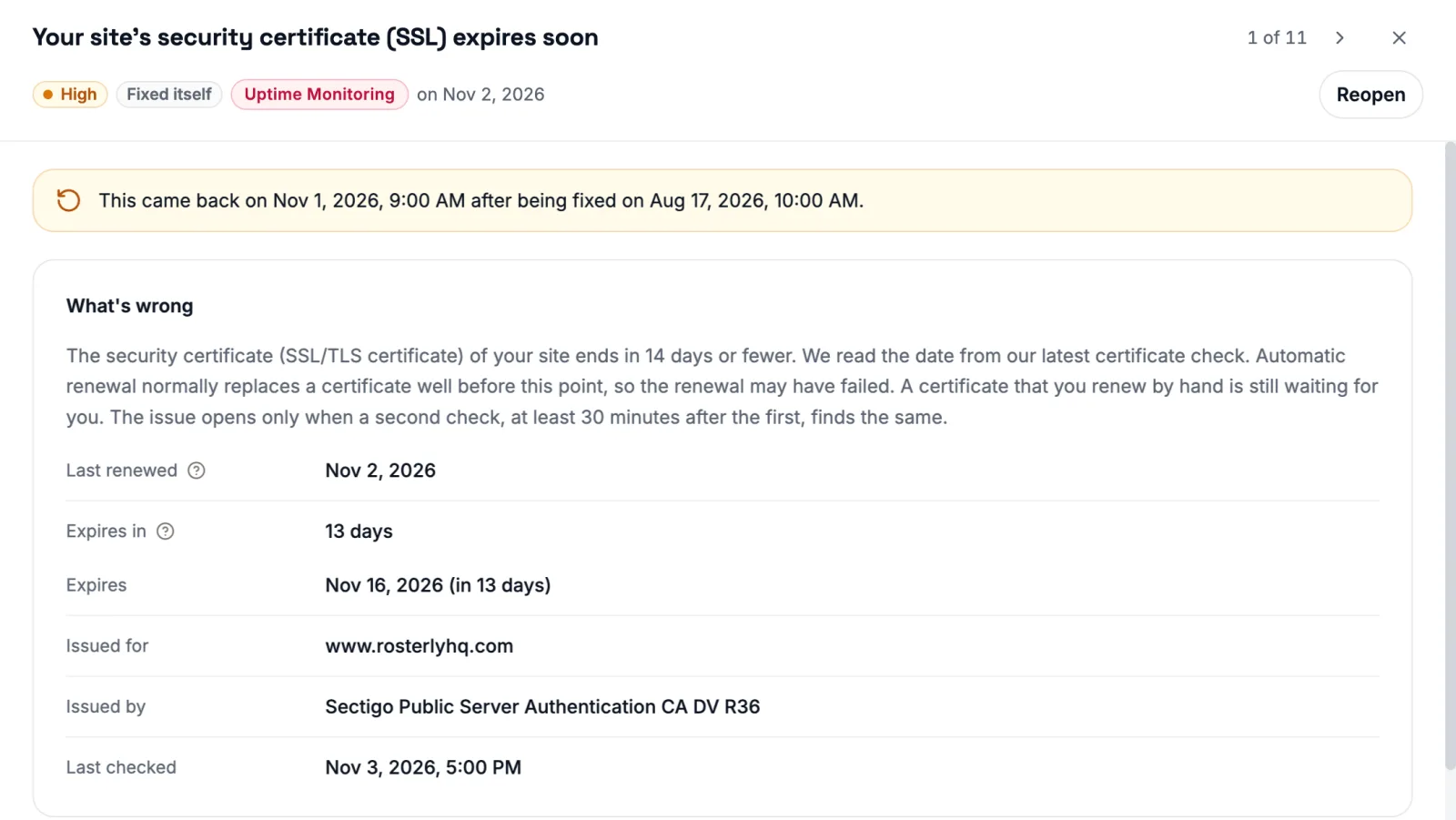 Demo workspace: the expiry issue is marked Fixed itself on Nov 2, shows 13 days left on the renewed certificate, and notes that it came back after an earlier fix.
Also compare the name the certificate was issued for with the host visitors use. On the demo site, the card shows it at a glance.
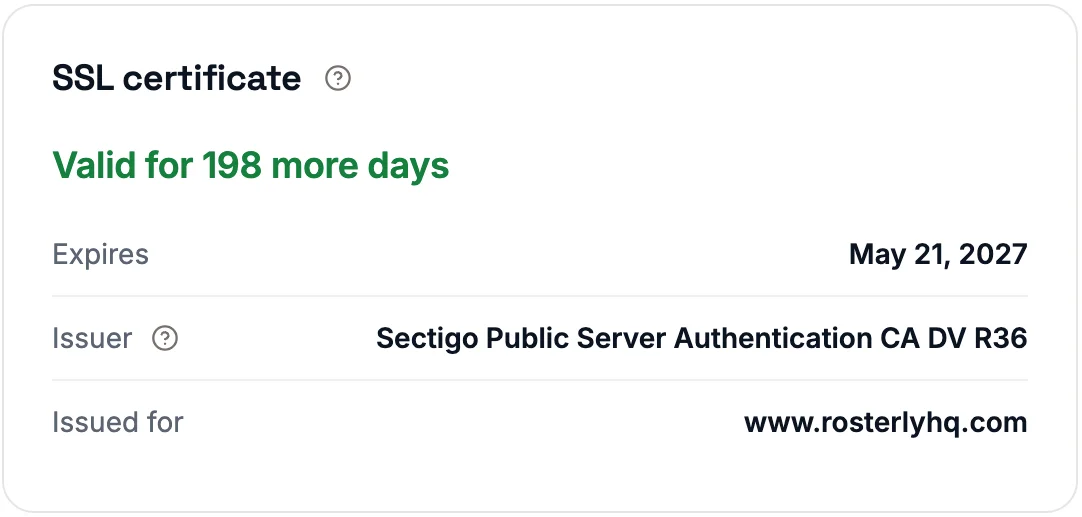 Demo workspace: the card names the host the certificate was issued for, so you can compare it with the host your visitors use.
It shows one name only, so check every hostname you serve, the www host and the bare domain included.
Domain expiry gets its own check in Uptime Monitoring. It's a different system. It fails worse. The fix runs through a registrar support queue, not a deploy. Check the payment card on file as well as the date. The certificate issue above opens at 14 days left or fewer. On a 45-day certificate that's close to a healthy renewal point, so don't rely on that line alone.
Watch one renewal happen
Paste each hostname you own into the expiry checker. Read the dates. Then watch one renewal happen and confirm the server presents the new certificate afterward.
An expired certificate is rarely a missed renewal. It's a renewal nobody watched, and with 47-day lifetimes you get a lot more of them.

Written by
Martin Stepanek
Enterprise Technical SEO Consultant
15+ years building enterprise websites and designing the infrastructure behind them, and 5+ in technical SEO and web performance. My work is making companies findable – not just on Google, but inside ChatGPT and the other AI engines people now ask first. I write a regular newsletter and blog on technical SEO at TechSEO Vitals, and I built VitalSentinel because the gap between something breaking and someone noticing should be minutes, not days.
The VitalSentinel Newsletter
New features as they ship and practical technical SEO tips. One email a week at most.
