
robots.txt generator to block AI crawlers
Decide which AI crawlers get to read your pages, and copy out the robots.txt rules that say so. Twenty are covered, from GPTBot and ClaudeBot to PerplexityBot and CCBot, and this free generator tells you what blocking each one costs you before you paste anything.
Choose what to block
Nothing is selected by default. The ? on each entry says what blocking it actually costs.
Crawlers that collect pages to build or improve models. Blocking them removes future crawls from those pipelines. It does not remove anything already collected, and it does not affect search rankings.
These collect pages for something other than training a model: an open web archive, knowledge-graph extraction, internal research, or a crawl a site owner asked for themselves. Their vendors do not describe them as training crawlers, so blocking them is a separate decision from the group above.
Crawlers that build AI search indexes, and fetchers that load a page because a person just asked an assistant about it. Blocking these is a traffic decision: it removes your site from those answers and from the citations that link back to you.
These tokens do not fetch anything. They tell a vendor how content its normal crawler already has may be used. Listing them changes usage permissions only, so nothing about your crawl budget or your search visibility changes.
Rules to paste into robots.txt
Pick crawlers above and the groups that block them are written here, ready to copy.
Nothing is selected yet, so there is nothing to paste. Select individual crawlers above, or use Select all to take a whole group at once.
Compare with a live site
Optional. See what a site allows each of these crawlers today, and what your selection would change.
This tool checks once.Robots.txt Monitoring keeps checking.
It checks on a schedule and alerts you the moment the result changes, so you never have to remember to run this again. Ask Theo, the AI assistant in the app, and it explains any finding in plain words.
The same check on every page you visit
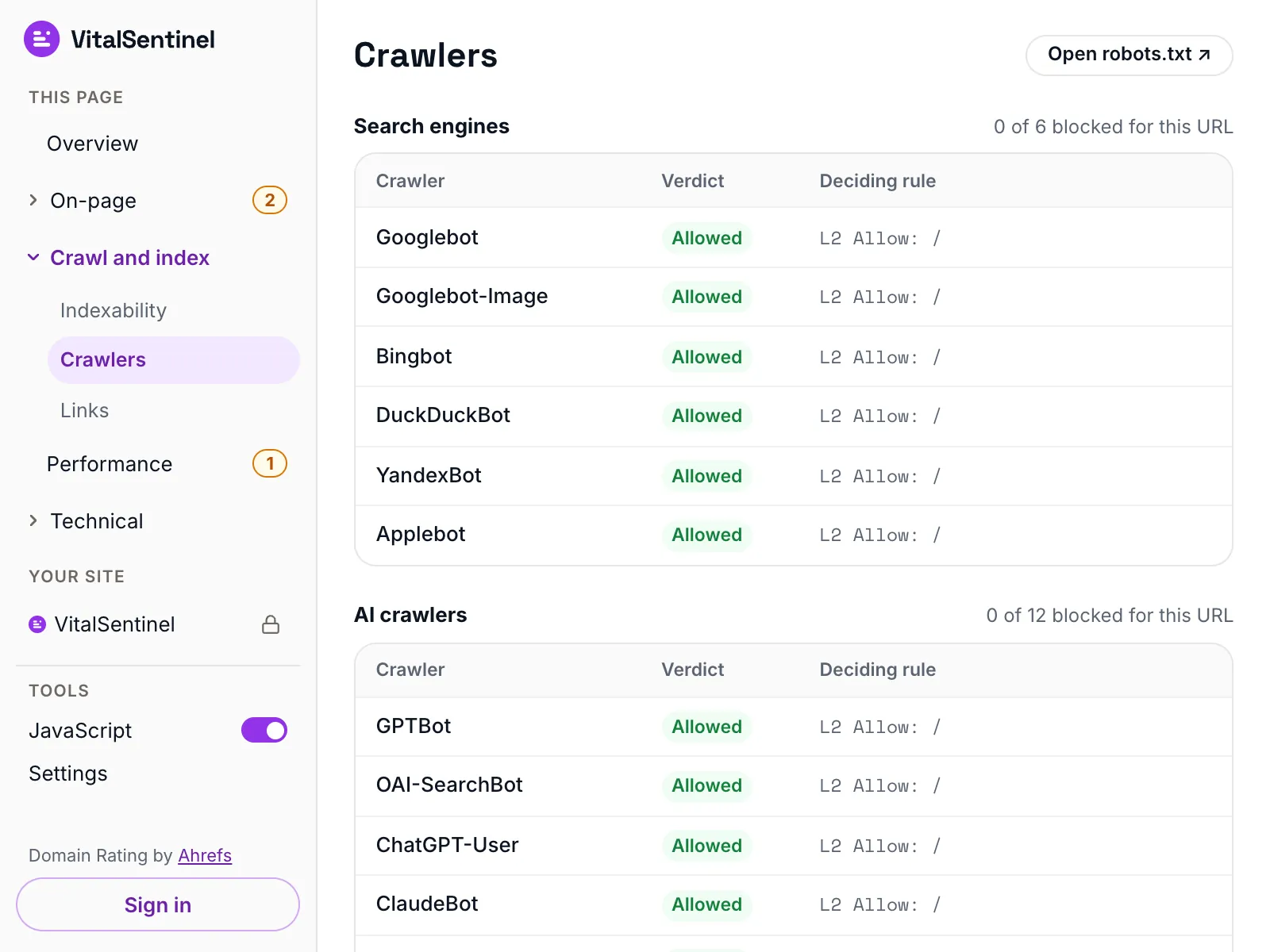
In the free VitalSentinel SEO Extension for Chrome, one click shows which of 12 AI crawlers and 6 search engines robots.txt lets in for the page you have open.
- Free
- No account needed
- One click
Know the crawler before you block it
Who runs each major AI crawler, its user agent, whether it obeys robots.txt and how to verify a visit.
- ClaudeBotAnthropicCrawls pages for Anthropic's model training.Follows robots.txt, per its vendor
- GPTBotOpenAICrawls pages that may be used to train OpenAI models.Vendor says robots.txt controls access
- OAI-SearchBotOpenAIBuilds the index behind ChatGPT search results.Vendor says robots.txt controls access
- BytespiderByteDanceByteDance's web crawler. ByteDance publishes no documentation we could verify on what it crawls for.robots.txt behavior not stated
- Meta-ExternalAgentMetaCrawls pages Meta may use to train AI models and improve its products.Vendor says robots.txt controls access
- CCBotCommon CrawlBuilds the Common Crawl public web archive.Follows robots.txt, per its vendor
- PerplexityBotPerplexityIndexes pages so Perplexity can link to and cite them.Vendor says robots.txt controls access
What it checks
- Writes valid robots.txt rules for 20 AI crawlers and usage opt-out tokens
- Sorts them into four groups – AI training crawlers, data collection crawlers, AI search and assistant crawlers, and usage opt-out tokens – so you can decide on each separately
- Marks the four that fetch a page only when a person asks an assistant about it, and the two that never fetch anything at all
- Optionally compares your picks with a live site's robots.txt, and flags any crawler already named in its own group there, which skips your User-agent: * rules
What it does not
- It cannot make a crawler obey anything. Blocking one for real happens at your CDN, firewall or web server
- It changes future visits only. Content already collected stays collected
- Every group it writes ends in Disallow: /, so it closes the whole site. Rules for one section, such as Disallow: /pricing/, you still write yourself
- It does not edit your site for you, and the live comparison reads the robots.txt at the site root only
Questions
Does blocking Google-Extended remove my content from AI Overviews?
No. AI Overviews and AI Mode are generated from the Google Search index, which Googlebot builds. Google-Extended only controls whether content Google already has may ground and train Gemini apps and the Vertex AI generative APIs.
Where do these rules go, and do subdomains need their own?
Add the groups to the robots.txt you already serve at the root of the domain, alongside your existing rules and Sitemap lines, rather than replacing the file.
Each subdomain reads only its own file, so blog.example.com needs the rules added separately from example.com.
If a crawler is already named somewhere in your file, edit that group instead of pasting a second one for it, and remember that a crawler with a group of its own stops reading your User-agent: * rules entirely.
Will blocking AI crawlers hurt my Google rankings?
No. None of these are Googlebot, so blocking them changes nothing about how Google Search crawls, indexes or ranks your pages. The one real risk is a rule that catches Googlebot by accident, so check your robots.txt again after you publish it.
Should I block assistant crawlers like ChatGPT-User?
That depends on whether you want the traffic. Those fetch a page because a person just asked about it, so blocking them means no answer, no citation and no link back.
The four groups exist so you can decide separately: block the training crawlers and leave the four marked Live user request open.
More free tools
Fair use, and how to recognize us
5 per minute · 25 per hour · 100 per day per IP (per /64 for IPv6), plus a per-site limit
Every request these tools make sends this user agent, including the ones that load a page in a real browser. What a run records is set out in our privacy policy.
Mozilla/5.0 (compatible; VitalSentinel Free Tools Bot/1.0; +https://www.vitalsentinel.com/bot)
Stop checking by hand
Core Web Vitals from real users, indexing and robots.txt, uptime and SSL, monitored continuously. Start on the Free plan and add your first domain in under a minute.